


Better Buzz
4.8364.00 Reviews
App Specs
- Version
- 2.1
- Updated On
- License
- Free
- Downloads
- 50,000+
- Developer
- Better Buzz Admin
- Categories
- Food & Drink
- Platform
- Android
Screenshots
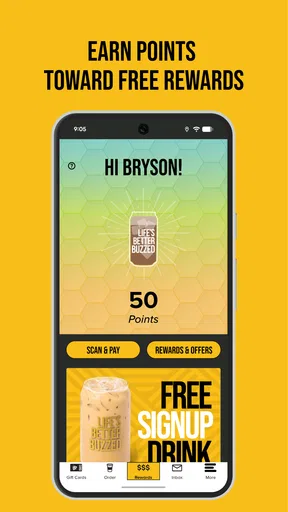
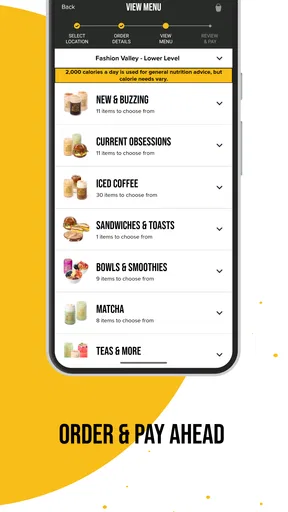
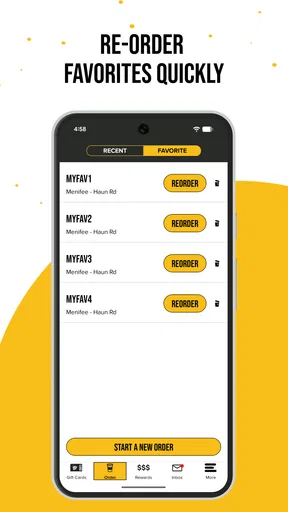
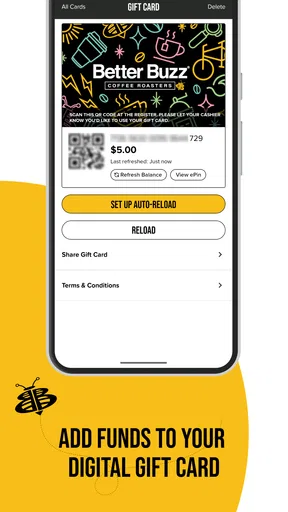
 Analysis by AppCompare
I usually judge a coffee app by what happens during a busy morning, not by how polished its store page looks. Better Buzz is the kind of Food & Drink app that makes sense when I am already deciding what to drink, where to pick it up, and whether ordering through a dedicated brand app is easier than using a general delivery service. After spending time with it, I see a focused companion for Better Buzz Coffee rather than a complete coffee-discovery platform. That narrow purpose is also its main strength.
Better Buzz is free to download, aimed at Everyone, and comes from Better Buzz Admin. It has built a strong user response, with a 4.8 average from around 3K ratings, and its reach has passed 50K installs. Those figures suggest that it is not an obscure experiment, but they do not automatically make it right for every coffee drinker. The real question is whether Better Buzz is part of your routine and whether you want a single place for that routine.
How it fits into a shared household coffee routine
The most convincing use case is a household where more than one person buys coffee but everyone has different habits. I can imagine one person checking the app before leaving for work, another adding a drink while getting children ready, and a third simply using it to look at the menu before agreeing on a stop. In that situation, the app is useful as a shared reference point even when the actual ordering is handled by one person.
A realistic morning might look like this: I open the app while standing in the kitchen, check what I want, and settle the order before driving. Someone else in the household may ask for a different drink, so I confirm the details with them before submitting anything. That small step matters. A coffee order is easy to rush, and a shared phone can turn a quick decision into a wrong size, missing modification, or duplicate order if two people are tapping at the same time.
I would not treat the app as a household dashboard, because it is presented as a Better Buzz coffee experience rather than a family coordination tool. Its value comes from keeping the coffee decision close to the brand, not from managing multiple people. If your household wants shared lists, separate profiles, detailed spending controls, or a common calendar, a general family app will remain better suited to that job.
For couples or roommates, the practical approach is to agree on who submits the order and who checks the final details. I find that more reliable than passing a phone around while the order is still being built. The app can support the coffee part of the routine, but the human agreement still matters when several people are involved.
What the focused design gets right
The app’s narrow focus makes it easier to understand than a broad restaurant marketplace. Instead of mixing coffee shops, restaurants, grocery items, and delivery choices, it is centered on Better Buzz Coffee. That can reduce the mental clutter of deciding where to start, especially when I already know I want something from this particular chain.
Worth Reading Before You Choose

EA SPORTS FC Mobile 26 Is a Bigger Football Game, but It Takes Time

Flipboard Shows What News Apps Must Do Beyond the Feed

Switching to Android Auto Means Rethinking Your Driving Routine

Google Calendar Makes a Crowded Week Easier to Manage

Ludo King Makes the Most of the Minutes Between Plans

Baby Panda World Brings Quick Play to Modern Phones, but Its Game Library Feels Busy
There is also a useful difference between browsing a coffee menu through a general search engine and using the brand’s own app. A search result may help me find a location, but it is not necessarily the best place to build a repeat order or keep my attention on Better Buzz’s own offering. The dedicated app feels more appropriate when the brand is already part of my routine.
That focus is not automatically an advantage for occasional visitors. If I am exploring several independent cafés in a new area, I would rather use a map or local discovery service. Better Buzz does not replace that broader search. It works best after I have already chosen the brand.
Setting up boundaries before the first shared order
When an app is used on a shared device, I prefer to decide in advance whose account is being used and who is responsible for the final tap. This is especially important with a coffee app because the action can feel casual even when it leads to a real purchase. One person may be browsing while another assumes the order has not been placed yet.
I would start by installing the current version, 2.1, on the device that is most convenient for the person who normally handles coffee runs. The app requires iOS 11 or later, so an older Apple device may need attention before installation. That operating-system requirement is worth checking before planning to use an old household phone as the shared ordering device.
My advice is to keep the setup simple: use one clearly understood account for the person who normally orders, and avoid treating a shared phone as if it automatically creates separate personal spaces. I would not assume that switching between household members is designed to be effortless or that each person’s choices will remain neatly separated. A dedicated personal phone is the cleaner option when several adults want independent control.
This boundary also helps with notifications and order status. If one person owns the phone, that person is more likely to notice a confirmation or a change that affects pickup. If everyone expects to receive the same information, confusion can follow. The app can be part of the process, but the household should decide who watches it.
Planning around pickup instead of treating the app as magic
One of the less obvious trade-offs is that an ordering app does not remove the need for timing. I would use it before leaving, not while driving, and I would allow enough time to deal with a crowded café or a change of plan. A fast tap on a screen does not guarantee that the rest of the morning will be equally fast.
For shared use, I would ask each person to state the order in a consistent format: drink, size, temperature if relevant, and any personal adjustment. Then I would compare the final screen with that spoken list before confirming. This sounds almost too basic, but it prevents the kind of mistake that happens when several people send requests through a single device.
Another useful habit is to decide whether the app is being used for a planned pickup or simply for menu browsing. Those are different activities. Browsing together on a sofa is low pressure; submitting an order while everyone is rushing out the door is not. Separating the two makes the app feel more dependable.
Account responsibility, age context, and household trust
The Everyone content rating makes the app approachable in an age context, but I would not read that as a recommendation for unsupervised purchasing by children. Age suitability and spending authority are separate questions. A young person may be able to view a coffee menu while still needing an adult to approve the order and handle any payment decision.
That distinction matters in a family. I would be comfortable letting a child help choose drinks on a parent’s phone, but I would keep the final order and payment step with the adult responsible for the account. The app can be part of a shared conversation without becoming an open purchasing channel.
For teenagers, the right arrangement depends on the household’s trust and the account owner’s expectations. If a teenager uses the app independently, everyone should understand whether that person is allowed to place an order, whether the purchase is personal or shared, and who will collect it. These boundaries are not app features; they are practical rules that prevent an ordinary coffee run from becoming an argument.
I also would not assume that the app provides family controls, child profiles, spending limits, or approval requests. Nothing about the focused coffee experience suggests that it should replace those tools. If those controls are essential, a household payment method with its own safeguards is a better foundation than relying on the coffee app alone.
Why trust matters more than convenience on a shared phone
Convenience can encourage people to tap quickly, especially when the order feels small. That is exactly when I think a little caution is useful. The person who submits an order should know which account is active, which device will receive updates, and whether the household is comfortable with the purchase being made at that moment.
On a personal phone, the app’s focused design feels straightforward. On a shared phone, the same simplicity can hide responsibility. A family member may assume that because the app is free, everything connected with using it is informal. The download costs nothing, but an order is still a real transaction. I would explain that difference clearly to anyone who is new to mobile ordering.
This is also why I would avoid leaving the app open at the final confirmation screen on a device used by several people. A child or guest might think they are only looking at the order and accidentally continue. I prefer locking in the household rule that browsing is fine, while submitting requires the account owner’s approval.
Where it beats the usual alternatives
Compared with a general delivery marketplace, the Better Buzz app offers a more direct relationship with one coffee brand. That is valuable when I already know where I want to buy and do not want unrelated restaurants competing for attention. A marketplace may be more useful when I need delivery comparisons, multiple restaurants, or a single order containing food from different places.
Compared with a mobile browser, the dedicated app is more natural for repeated use. I do not have to begin by searching for the brand, checking whether I am on the correct page, and then working through a general website layout. The trade-off is that an app devoted to one chain takes up space for a narrower purpose. Occasional visitors may reasonably prefer the browser or a map application.
Compared with ordering at the counter, the app can make advance planning easier, particularly when I already know my usual drink. Counter service remains better when I need to ask questions, discuss an unfamiliar item, or change my mind through conversation. A screen is efficient for a known routine, but a staff member is usually better for personal guidance.
Compared with a family messaging thread, the app is better for keeping the actual coffee choice in one place, while messaging is better for coordination. I would use both: messages to ask what everyone wants, then the app to handle the brand-specific part. Trying to force one tool to do both jobs is where confusion begins.
Small workflows that make the app more useful
My first practical tip is to create a household “order check” before submitting: say each drink aloud, verify the intended location, and make sure the person collecting it knows what to expect. This is particularly useful when one person is ordering for several people and the phone is being passed around.
My second tip is to use the app as a decision aid before the rush rather than as a last-second rescue. If everyone chooses while still at home, the person placing the order can move through the process without stopping in a parking lot. That improves safety and reduces the chance of entering the wrong information under pressure.
My third tip is to separate recurring personal preferences from shared household assumptions. I would not assume that because one person always wants a particular drink, everyone knows the exact details. Let each person confirm their own choice, even if the order is familiar. This is a simple way to avoid silent substitutions and misunderstandings.
A fourth useful trade-off is deciding when not to use the app. If the group is still debating where to go, start with a map or a conversation. If the group has already chosen Better Buzz and knows the order, the dedicated app becomes the more efficient tool. Choosing the right starting point saves more time than trying to make one app handle every stage.
Who should use it and who should skip it
I think Better Buzz is a good fit for regular customers who want a focused coffee-ordering companion and already recognize the brand’s locations or menu. It is also suitable for households where one person commonly coordinates the coffee run and everyone is willing to confirm their requests before that person submits the order.
It is less compelling for someone who visits many unrelated cafés, wants one app to compare every nearby option, or needs broad delivery features. It may also be a poor match for a household that expects separate profiles, formal parental approval, or detailed spending controls. Those needs call for tools built around family management rather than a single coffee chain.
The app is free, which lowers the barrier to trying it, and its Everyone rating makes it easy to consider for a mixed-age household. Still, I would judge it by the routine it supports, not by the download price. If I only visit Better Buzz once in a while, a browser or map may be enough. If I go often, the dedicated experience has a clearer reason to stay on my phone.
The developer, Better Buzz Admin, has kept the product identity closely tied to the coffee brand, and that clarity comes through in daily use. I do not see it as a universal food app, and I would not want it to pretend to be one. Its job is narrower: help people who have chosen Better Buzz move from intention to coffee with less friction.
My household verdict is positive, with sensible boundaries. I would recommend it to a family or shared home as long as one person owns the account process, adults control purchases, and everyone treats the app as a coffee-ordering tool rather than a family-management system. Used that way, Better Buzz is a practical free companion for repeat visits: focused, approachable, and most valuable when the brand is already part of the household routine.
Pros
- Simple interface makes browsing and discovering content quick.
- Personalized recommendations help surface relevant choices.
- Smooth performance on most modern Android and iOS devices.
- Useful notifications can keep users updated on new activity.
- Easy sharing options make inviting friends or sharing content convenient.
Cons
- Some features may require an account or personal information.
- Recommendations can feel repetitive after extended use.
- Notifications may become distracting without careful settings.
- Performance may vary on older devices or weaker connections.
- The app may offer limited customization for advanced users.
FAQs for Better Buzz
What is Better Buzz, and what can I use it for?
Better Buzz is designed to help users discover and engage with content, services, or community features connected to the Better Buzz experience. Depending on the version available in your region, the app may provide updates, promotional information, interactive features, and convenient access to related offerings. Before downloading, check the official store description because features and availability can vary between Android and iOS.
Is Better Buzz free to download and use?
Better Buzz can generally be downloaded without an upfront charge, but some features, products, promotions, or services accessed through the app may involve additional costs. It is worth reviewing the in-app information carefully before confirming a purchase. Users should also check whether optional subscriptions, paid upgrades, or location-specific offers are available, since pricing and conditions may differ by country.
Does Better Buzz require an account or personal information?
Some parts of Better Buzz may be available without registration, while features such as personalized content, rewards, ordering, saved preferences, or account management may require personal details. During setup, review the requested permissions and privacy policy to understand how information is collected and used. Avoid providing unnecessary data, and use a strong, unique password if account creation is required.
Is Better Buzz available on both Android and iPhone?
Availability depends on the official app listings and your location. Better Buzz may be offered for Android devices through Google Play and for iPhone or iPad through the Apple App Store, although supported operating-system versions can change over time. Before installing, confirm the developer name, recent update date, device compatibility, and download source to avoid unofficial or imitation applications.
What should I check before downloading Better Buzz?
Before downloading Better Buzz, review the app’s permissions, privacy information, user ratings, recent comments, and required operating-system version. Also confirm that your device has enough storage and that the application comes from the verified developer. If the app uses location, notifications, camera access, or account information, decide whether those permissions are necessary for the features you actually plan to use.


